Kubernetes — Foundation & Architecture
Step-by-step style intro: containers vs VMs, why clusters exist, control plane vs workers, local cluster with Minikube, first kubectl checks
What you will learn in this lesson
By the end of this page you should be able to:
- Explain why teams run Kubernetes instead of only Docker on one VM.
- Compare containers and virtual machines in one sentence each.
- Name the main control plane and worker pieces and know who applies your YAML.
- Have a local cluster option in mind (Minikube or similar) and know which commands prove
kubectlcan talk to it.
If you already run containers daily, skim the first section and jump to What a Kubernetes cluster is.
Part 1 — Containers vs virtual machines
When you ship an app with Docker, you package the app plus its libraries into an image. A running container is an isolated process on a host, sharing the host kernel.
A virtual machine runs a full guest operating system on top of a hypervisor. That is heavier (disk, boot time) but gives stronger isolation.
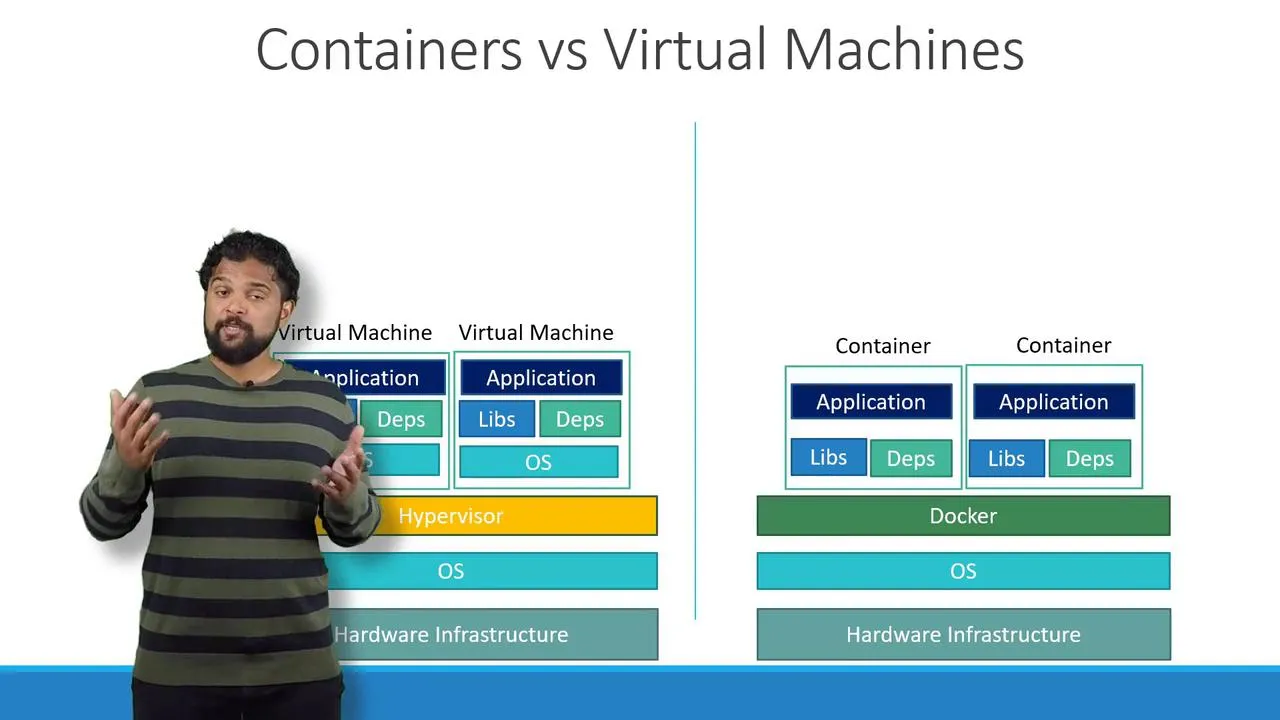
Quick check (ask yourself):
- Image = blueprint on disk (in a registry).
- Container = running instance of that blueprint.
- Many containers can share one image.
Part 2 — Why “orchestration” exists
On a single server you might run:
docker run my-appdocker run my-appdocker run my-appWhen traffic grows, you add containers. Then you must handle crashes, rolling upgrades, service discovery, and scheduling across machines by hand or with scripts. Kubernetes automates that: you declare desired state (how many copies, which image, how they talk); controllers keep actual state matching.
Part 3 — What a Kubernetes cluster is
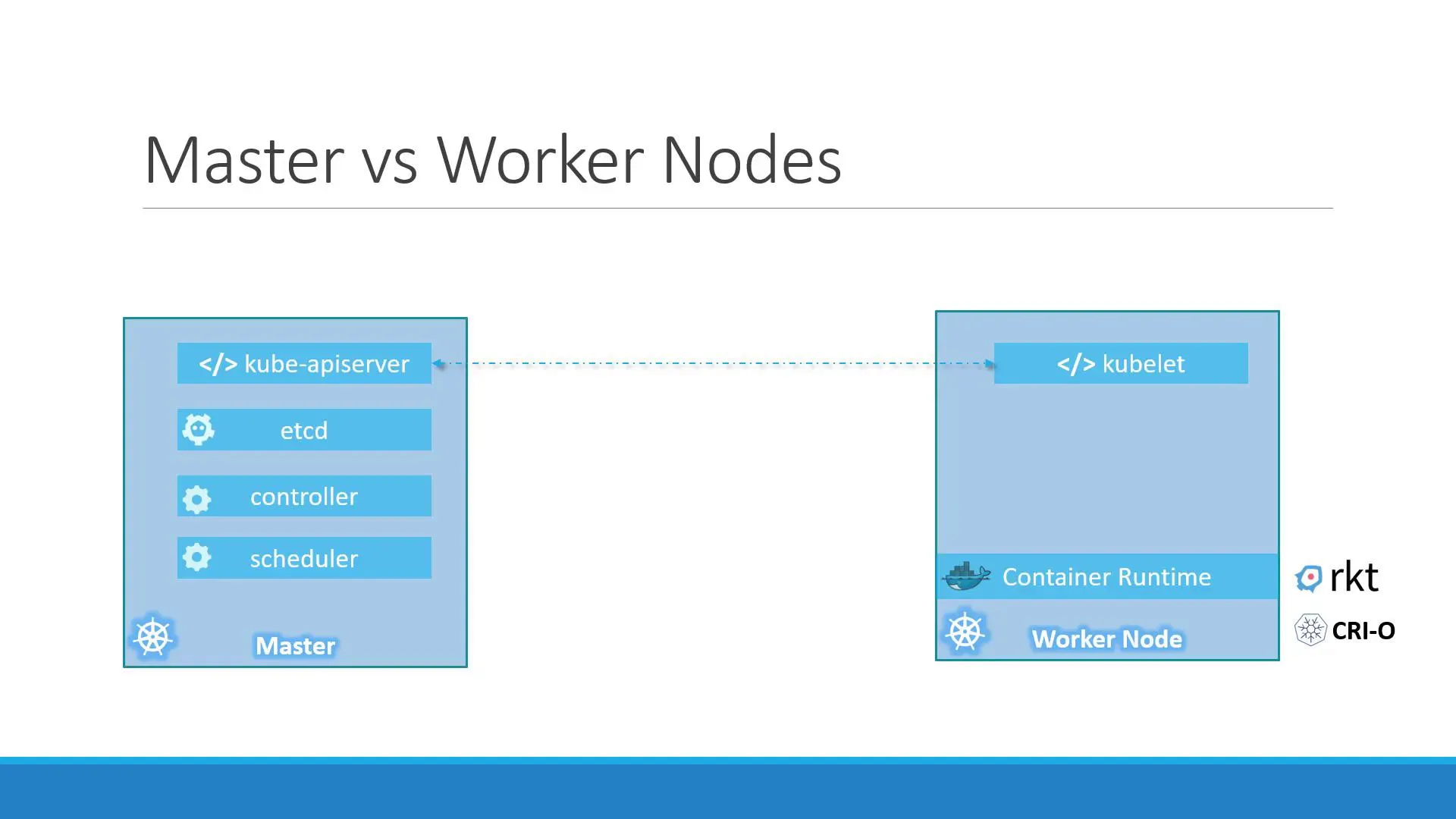
A node is a machine (VM or metal) that runs Kubernetes components. Several nodes form a cluster. You almost never SSH into nodes to start apps in the “Kubernetes way”—you send objects to the API server with kubectl (or CI/GitOps), and the system reconciles.
| Area | What it does (revision phrase) |
|---|---|
| Control plane | API server (front door for kubectl), etcd (cluster data), Scheduler (picks a node), Controllers (Deployments, ReplicaSets, …). |
| Workers | kubelet (starts/stops pods on that node), kube-proxy (Service networking), container runtime (often containerd). |
Who does what when you type kubectl apply
| Step | Who |
|---|---|
You run kubectl apply -f app.yaml | You change desired state in the API. |
| API persists the object | API server + etcd. |
| “We need 3 pods with this template” | Deployment controller creates/updates a ReplicaSet. |
| “Count must be 3” | ReplicaSet controller creates/deletes Pods. |
| “This pod needs a node” | Scheduler binds pod → node. |
| “Pull image, start container” | kubelet on that node. |
So: you set intent; controllers + scheduler + kubelet do the work.
Part 4 — Run a cluster on your laptop (Minikube)
Goal: one working API so the rest of these notes match a real cluster.
4.1 — Prerequisites (checklist)
| Item | Why |
|---|---|
| A hypervisor or Docker | Minikube needs a driver (Docker, Hyper-V, VirtualBox, KVM, …). |
kubectl installed | Talks to any cluster, including Minikube. |
minikube installed | Starts the local control plane + node. |
Install from the official docs (pick your OS there):
- kubectl: Install Tools
- Minikube: Start
4.2 — Start the cluster
Example (driver depends on your machine):
minikube start# or explicitly, e.g. on Linux with KVM:# minikube start --driver=kvm2Wait until the command finishes without errors.
4.3 — Verify
kubectl get nodesYou want STATUS Ready for your node (Minikube usually shows one node named like minikube).
kubectl cluster-infokubectl get nsIf kubectl get nodes errors, fix kubeconfig / context first (kubectl config get-contexts) before continuing to the next note.
Part 5 — Optional discovery commands
kubectl api-resourceskubectl explain pod --recursiveNext lesson: Pods, YAML manifests, ReplicaSets, Deployments, and rollouts — open the Pods, ReplicaSets & Deployments note.